
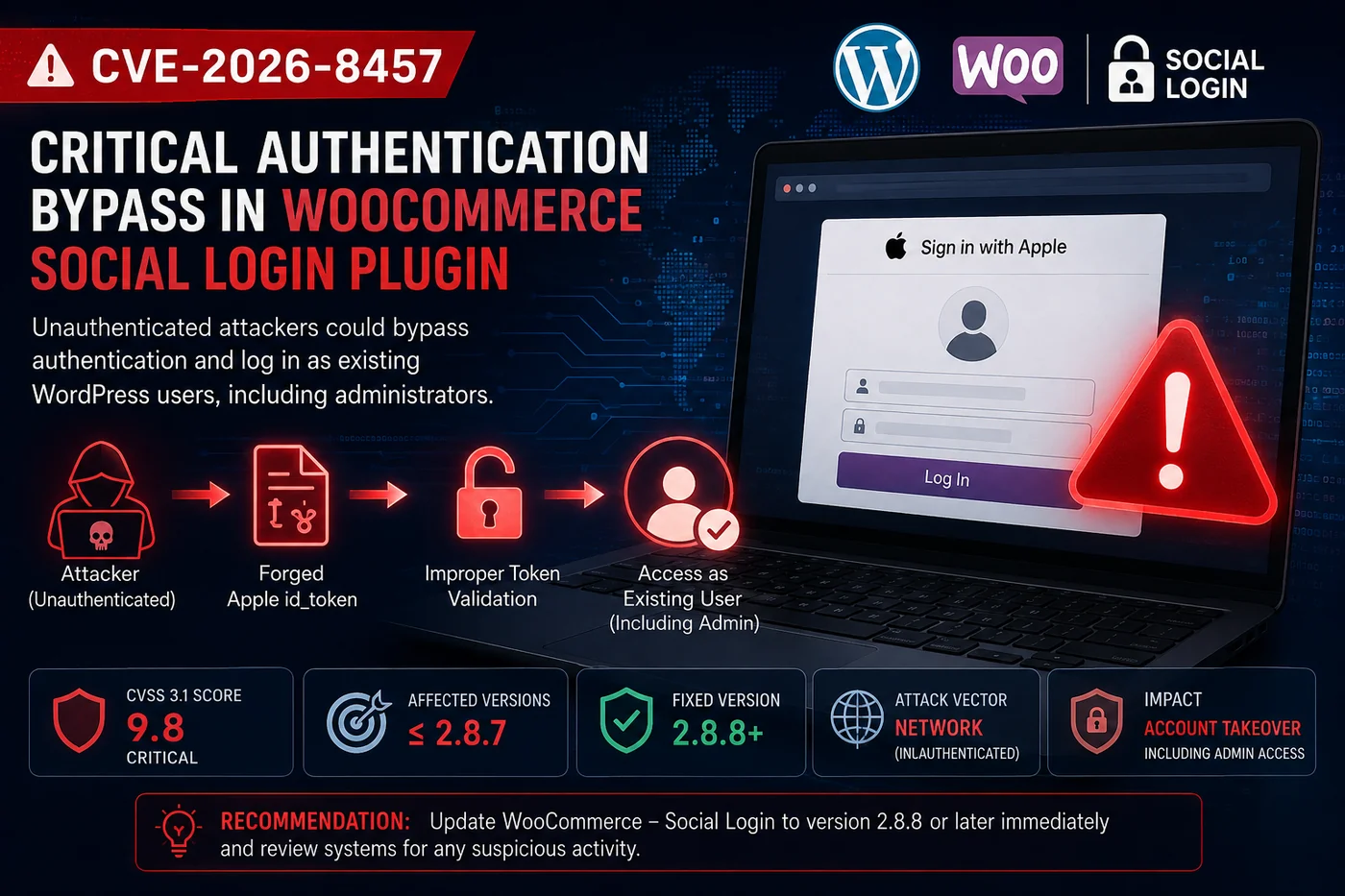
CVE-2026-8457 is a critical authentication bypass vulnerability in the WooCommerce – Social Login plugin for WordPress. The vulnerability affects versions up to and including 2.8.7 and was assigned a CVSS 3.1 score of 9.8 (Critical).
The issue is particularly concerning because an unauthenticated attacker could potentially log in as an existing WordPress user, including an administrator, without knowing that user’s password. The vulnerability was publicly disclosed in August 2026, and the affected plugin has since been patched in version 2.8.8.
For a VAPT team, this is an interesting vulnerability because the problem isn’t with the user’s password itself.
The application was not properly verifying the identity information it received during the social login process.
What is WooCommerce – Social Login?
WooCommerce – Social Login is a WordPress plugin that allows users to sign in to websites using external identity providers instead of creating or entering a traditional username and password.
For a website owner, this can make the login process easier for customers. For an attacker, however, any weakness in that authentication process can become a serious problem.
The reason is simple: the social login plugin is not just another feature on the website. It becomes part of the website’s authentication system. If that component incorrectly decides that someone is a legitimate user, WordPress may create an authenticated session for an attacker.
What caused the vulnerability?
The vulnerability is related to the way the plugin handled Sign in with Apple.
When a user signs in through Apple, the application receives something called an id_token. This token contains information about the identity being authenticated. The important part is that an application should not simply read the information inside the token and assume it is genuine. It needs to verify that the token was actually issued by Apple and that it is valid for the application.
According to NVD, the vulnerable plugin decoded the Base64 payload of the Apple token but did not properly verify its JWT signature against Apple’s public keys. It also failed to properly validate important claims such as the issuer, audience and expiration.
There was another part of the problem as well. The security nonce required to start the login flow was exposed to unauthenticated users through a JavaScript object on the login page. This meant that the application was trusting information that should have been properly verified first.
Put simply:
Attacker → sends a forged identity token → application trusts the token → WordPress creates an authenticated session
That is what makes this an authentication bypass.
Why does it matter?
The severity comes from who an attacker could potentially become after exploiting the vulnerability. The issue does not simply expose a piece of information or cause a minor change to the website.
According to NVD, an unauthenticated attacker could use a forged token containing the email address of an existing WordPress user and potentially log in as that user, including an administrator. If the targeted account has administrative privileges, the situation becomes much more serious. An administrator can normally access areas such as:
- WordPress settings
- Plugins and themes
- Website content
- User accounts
- WooCommerce configuration
- Customer and business information
The exact impact will depend on how the WordPress environment is configured, but gaining an administrator session can put the entire website at risk. For an organization using WooCommerce for an online business, this could potentially affect much more than the login page.
How does the attack work?
The technical details can get complicated, but the basic idea is fairly straightforward.
- 01Publicly accessible WordPress login page
- 02Attacker obtains the information needed to invoke the social login flow
- 03Attacker supplies a specially crafted Apple id_token
- 04Plugin decodes the token without properly verifying its authenticity
- 05The email address in the token is used to identify a WordPress account
- 06WordPress creates an authenticated session
- 07Attacker gains access as the targeted user
The important part here is that the attacker does not need the victim’s password. The weakness is in the application’s trust of the authentication token.
For an authorized VAPT engagement, testing should of course only be performed against systems that are explicitly included in the client’s scope.
Which versions are affected?
The vulnerability affects WooCommerce – Social Login versions 2.8.7 and earlier. The issue has been fixed in version 2.8.8.
| Version | Status |
|---|---|
| 2.8.7 and earlier | Affected |
| 2.8.8 and later | Patched |
Organizations should check the actual version installed on their WordPress environments, particularly if they manage multiple websites.
What should organizations do?
The first and most important step is simple: update the plugin. Organizations running an affected version should upgrade WooCommerce – Social Login to version 2.8.8 or later.
But patching should not necessarily be the end of the investigation. If an affected version was publicly accessible, security teams should also consider reviewing the environment for signs of unauthorized access. This can include checking for:
- Unexpected administrator logins
- Newly created or modified accounts
- Unusual login activity
- Changes to plugins or themes
- Unexpected configuration changes
- Suspicious website modifications
Fixing a vulnerability tells you that the problem is no longer present. It does not tell you whether somebody used it before it was fixed.
What VAPT teams can learn from CVE-2026-8457
This vulnerability is a good example of why authentication testing should go beyond checking whether a login form accepts the correct username and password. Modern applications increasingly depend on third-party identity providers and authentication plugins. That means a VAPT needs to look at the entire authentication chain:
User → Identity Provider → Token → Application Validation → Session → Authorization
If one of those steps incorrectly trusts information from another system, the entire authentication process can potentially be affected. CVE-2026-8457 also highlights an important point about JWT security: decoding a token is not the same as verifying a token. A token may contain perfectly valid-looking information while still being completely untrusted.
Where Depth Defense fits in
At Depth Defense, this is exactly the type of vulnerability that shows why VAPT should go beyond simply running a scanner and reporting an outdated plugin. A scanner may identify that a WordPress installation is running WooCommerce – Social Login 2.8.7. That’s useful, but it is only the starting point. A proper assessment should answer the next questions:
- Is the affected plugin actually installed and being used?
- Is the vulnerable authentication functionality exposed?
- What accounts could potentially be affected?
- What level of access would a compromised account provide?
- Was the affected version exposed before it was patched?
Those questions turn a basic CVE detection into an actual security assessment. This is especially important for organizations where WordPress is not simply being used as a brochure website, but is connected to e-commerce, customer accounts, business data or other sensitive functionality.
At Depth Defense, our approach is to understand the vulnerability in the context of the client’s actual environment. Automated tools are useful for finding known issues, but manual validation helps determine whether those issues can realistically affect the organization. The goal isn’t to give a client a report containing hundreds of vulnerability names. The goal is to understand what matters, what could actually be exploited and what should be fixed first.
For organizations in Saudi Arabia, this becomes particularly important as applications increasingly rely on third-party plugins, integrations and external authentication services. A VAPT should therefore not just ask “Is this component vulnerable?” It should also ask “What does this vulnerability mean for our application?” That is where Depth Defense can add value.